⚠️ Manage Warning
Maintain performance accountability by issuing formal warnings when employees deviate from expected conduct or performance standards.
📌 Overview
The Manage Warning feature is used to:
Issue official warnings to employees
Track who issued the warning and why
Document the incident for future reference
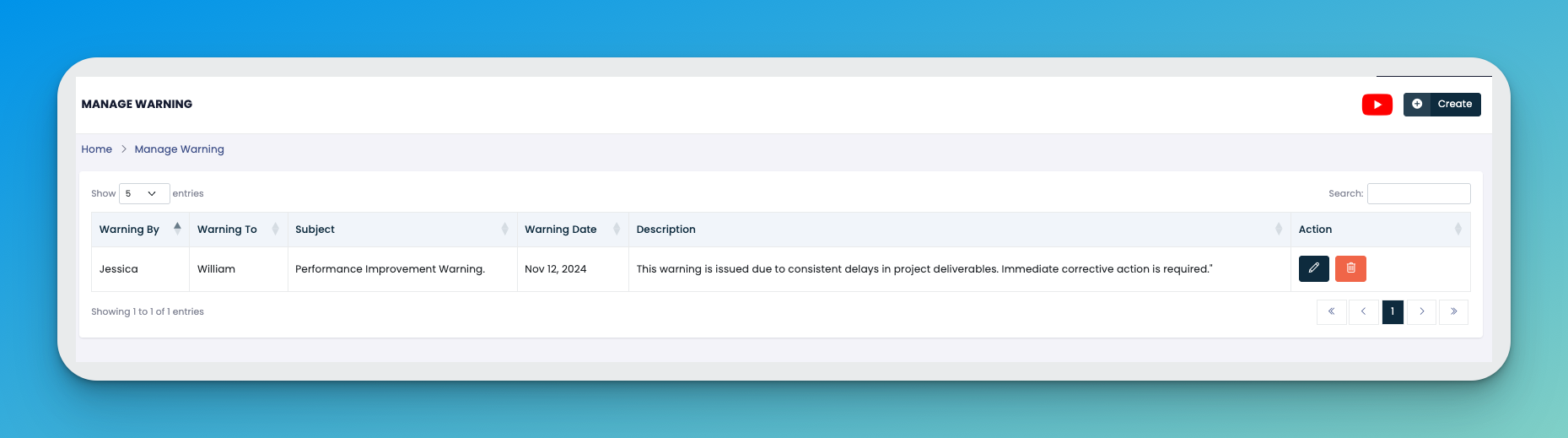
✅ How It Works
Click the ➕ Create button to add a new warning.
Fill out the required fields:
👩💼 Warning By – The person issuing the warning
👨💼 Warning To – The employee receiving the warning
📝 Subject – A brief title (e.g., Performance Improvement Warning)
📅 Warning Date – The date the warning is issued
📄 Description – Explanation of the issue and any corrective action expected
Click Save to finalize the record.
🛠️ Action Buttons
✏️ Edit – Modify warning details (only if needed).
🗑️ Delete – Remove the warning if it was created in error.
💡 Tips
Keep subjects concise but informative (e.g., "Attendance Violation", "Behavioral Misconduct").
Use warnings to document repeated offenses for future disciplinary action if necessary.
Always align with your company's HR policy when issuing warnings.
🎥 Video Tutorial
👇👇
[Warnings ]
❓ Common Questions
Q: Can I issue multiple warnings to the same employee?
A: Yes. Each incident should be logged as a separate entry for clear record-keeping.
Q: Is the employee notified through the system?
A: Currently, notifications need to be managed manually via internal communication or through printed acknowledgment if needed.