The Leave Status section gives you a clear view of all employee leave activity—monthly or yearly. It's designed for managers and HR teams to track approved, rejected, and pending leave requests across branches and departments.
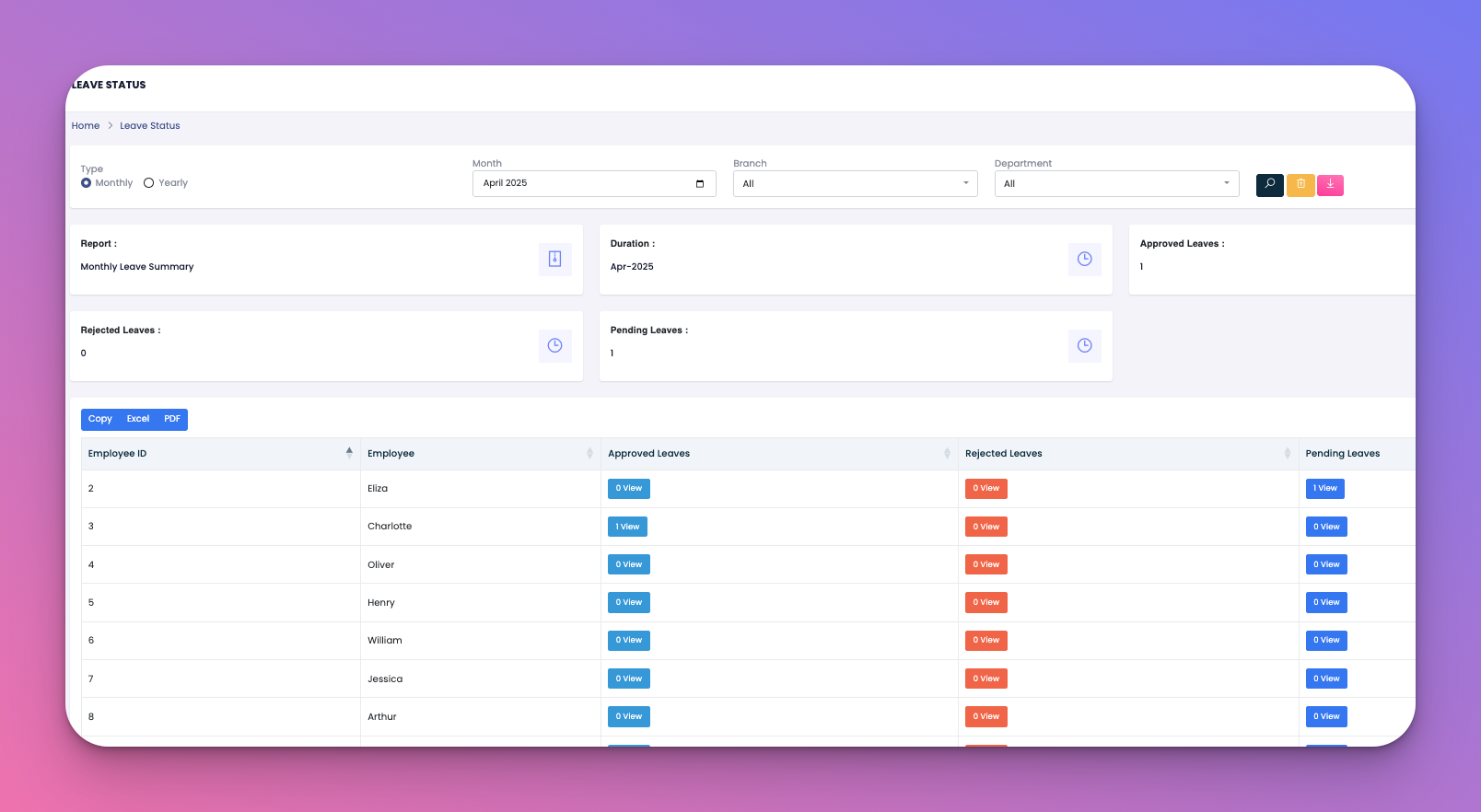
See how many leaves were approved, rejected, or are still pending.
Filter by branch, department, and time period.
Check leave records of individual employees.
Export reports for internal or payroll use.
Step 1: Choose Your Filters
Type: Select either Monthly or Yearly.
Month: Pick the month you're reviewing (if Monthly is selected).
Branch: Choose a location (or leave it on "All").
Department: Narrow down by team or role.
Click the search icon after selecting your filters to generate the report.
Step 2: Review the Summary
Approved Leaves: Number of approved requests for the selected time period.
Rejected Leaves: Count of denied applications.
Pending Leaves: Requests that are still awaiting action.
Duration: Shows which month or year the report covers.
Step 3: Explore the Leave Breakdown
Each employee's record is listed with:
Their employee ID and name
How many approved leaves they had
If any leaves were rejected
If they have pending requests
Click the View button next to each type to open a detailed popup showing:
Leave type (Casual, Sick, Personal)
Leave date range
Total leave days taken
Reason provided for the leave
Above the list, you can export the data using:
Copy – Copies the report data to your clipboard.
Excel – Downloads the report in spreadsheet format.
PDF – Generates a printable PDF file.
Use the Monthly option for day-to-day operations and the Yearly option for HR analysis.
Encourage quick approval of pending leaves to avoid scheduling issues.
Export reports each month to share with payroll or department heads.
Q: Can I search for a specific employee?
Yes, use the search bar at the top right to find someone by name or ID.
Q: What does ‘0 View’ mean next to a leave type?
It means the employee hasn't taken that type of leave during the selected period.
Q: How do I download all data for backup or payroll?
Click the Excel or PDF button to export the report with your current filters.
Q: Are employees notified when their leave is approved or rejected?
Yes, they receive a notification immediately after a decision is made.