This section is used by accountants and payroll teams to manage monthly salary slips and payroll-related documents across branches.
The module allows you to view, upload, and annotate salary slips for selected employees in specific branches and departments.
To get started, use the filters at the top:
Branch – Choose the location (e.g., London HQ, Holborn Branch)
Department – Filter staff by department (e.g., Kitchen, Admin)
Employees – Focus on specific staff
Choose Type – Only “Salary Slips” (for now)
Select Month – Pick the relevant payroll month
Click Submit to display results based on selected filters.
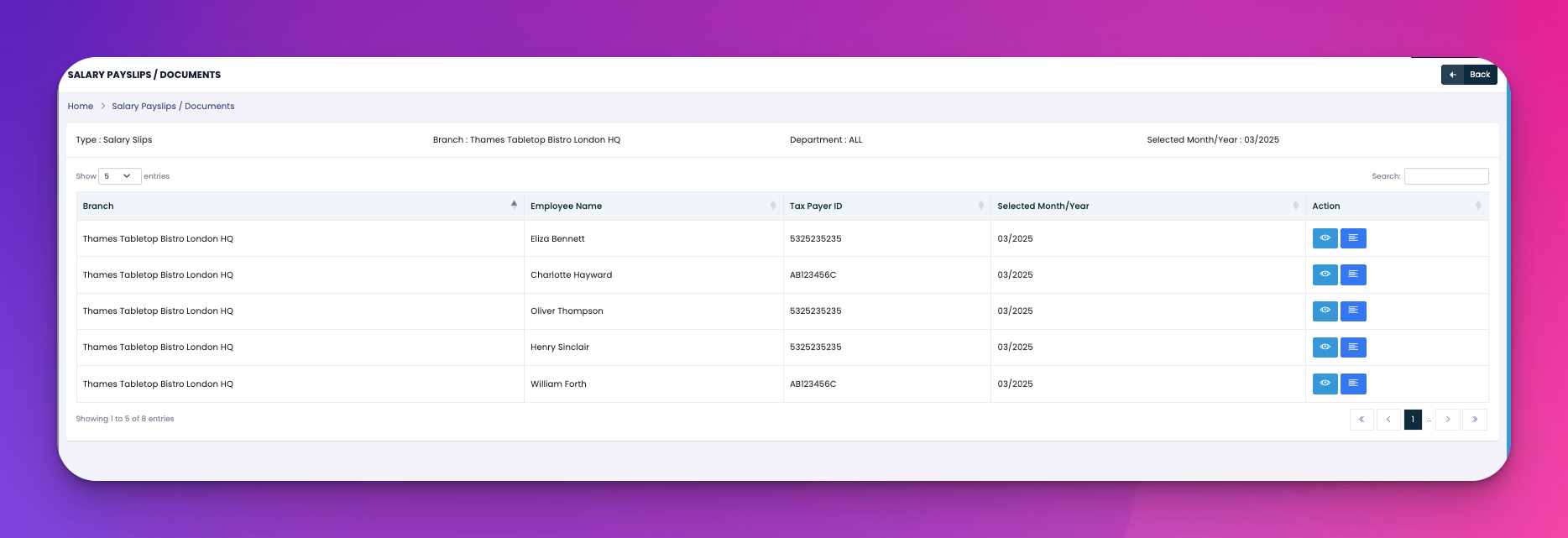
Once filtered, a table will appear showing:
Branch – Where the employee works
Employee Name
Tax Payer ID
Selected Month/Year
Action Buttons:
👁️ View/Upload: Open the current file or upload a new salary slip
📄 Add Note: Attach internal notes or comments related to the payslip
🎥 Video Tutorial 👇👇
[Video Placeholder]
Q: Can I upload salary documents in bulk?
A: Not in this section. Uploads are done individually via the 👁️ view button.
Q: Who can access uploaded payslips?
A: Only authorized payroll or admin users based on role permissions.
Q: What format should documents be in?
A: PDF or image formats are recommended.