The Share Report section allows you to securely send selected financial or performance reports directly to specific accountants via email. This helps in streamlining communication and record-keeping between your business and external finance professionals.
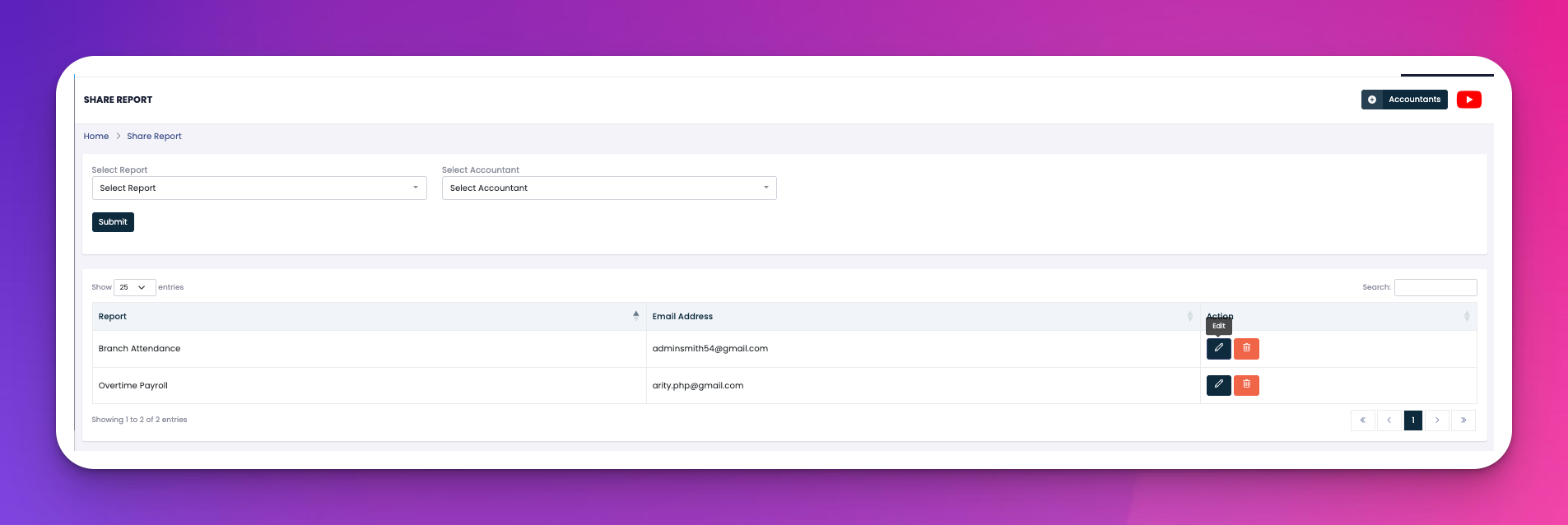
Select Report: Dropdown list of available reports (e.g. Sales Vs Expenses, Payroll Summary, Overtime Report).
Select Accountant: Choose a saved accountant to share the report with.
Submit Button: Click to send the selected report via email to the chosen recipient.
After submitting, the lower section shows a table with shared report records:
Report: Name of the shared report.
Email Address: Recipient who received the report.
Actions:
🖊️ Edit – Change the report or recipient.
🗑️ Delete – Remove the sharing record.
Q: What happens when I click "Submit"?
A: The selected report is emailed as an attachment or secure link to the chosen accountant.
Q: Can I resend a report to a different email?
A: Yes, just click the ✏️ Edit icon and update the recipient’s email.
Q: Can I see when a report was sent?
A: Currently, the system does not display timestamps for shared reports.
Q: How can I manage my list of accountants?
A: Use the "Accountants" button at the top-right to view, add, or remove accountant profiles.