The Documents Hub is a centralized system for managing and tracking employee documents across branches, departments, and document types. It simplifies compliance, verification, and administrative oversight.
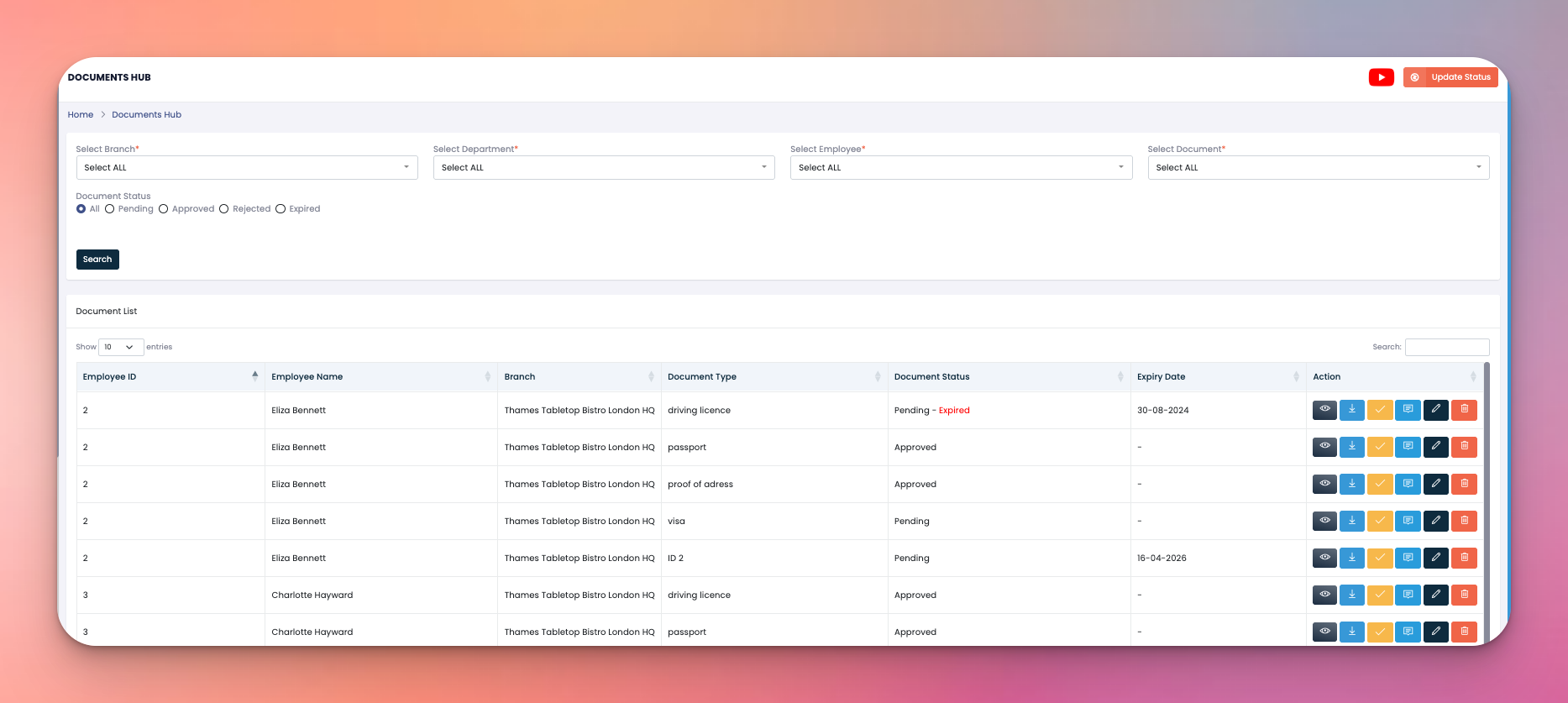
At the top, there are five dropdown filters that help narrow down the search:
Select Branch – Filter documents by branch location
Select Department – Filter by department (e.g., Kitchen, FOH, etc.)
Select Employee – Focus on a specific staff member
Select Document – Choose document types like Passport, Visa, NI, etc.
Document Status – Options: All, Pending, Approved, Rejected, or Expired
➡️ Search button fetches the filtered data instantly.
Below the filters, you see a table with the following columns:
Employee ID & Name – Identifies the staff member
Branch – Shows which location the staff works at
Document Type – Examples: Passport, Proof of Address, Visa, Right to Work
Document Status – Indicates if it’s Pending, Approved, or Rejected
Expiry Date – Automatically tracks expiry deadlines
Action Buttons:
👁️ View the document
📥 Download file
✅ Approve
❌ Reject
📄 Add notes/comments
✏️ Edit
🗑️ Delete
In the top-right corner:
Update Status – Enables status changes for multiple documents at once
📺 Video Icon – Opens a tutorial or onboarding video related to the module