The eContracts module helps businesses streamline the creation, assignment, and management of employment contracts within the organization. Let’s explore its components:
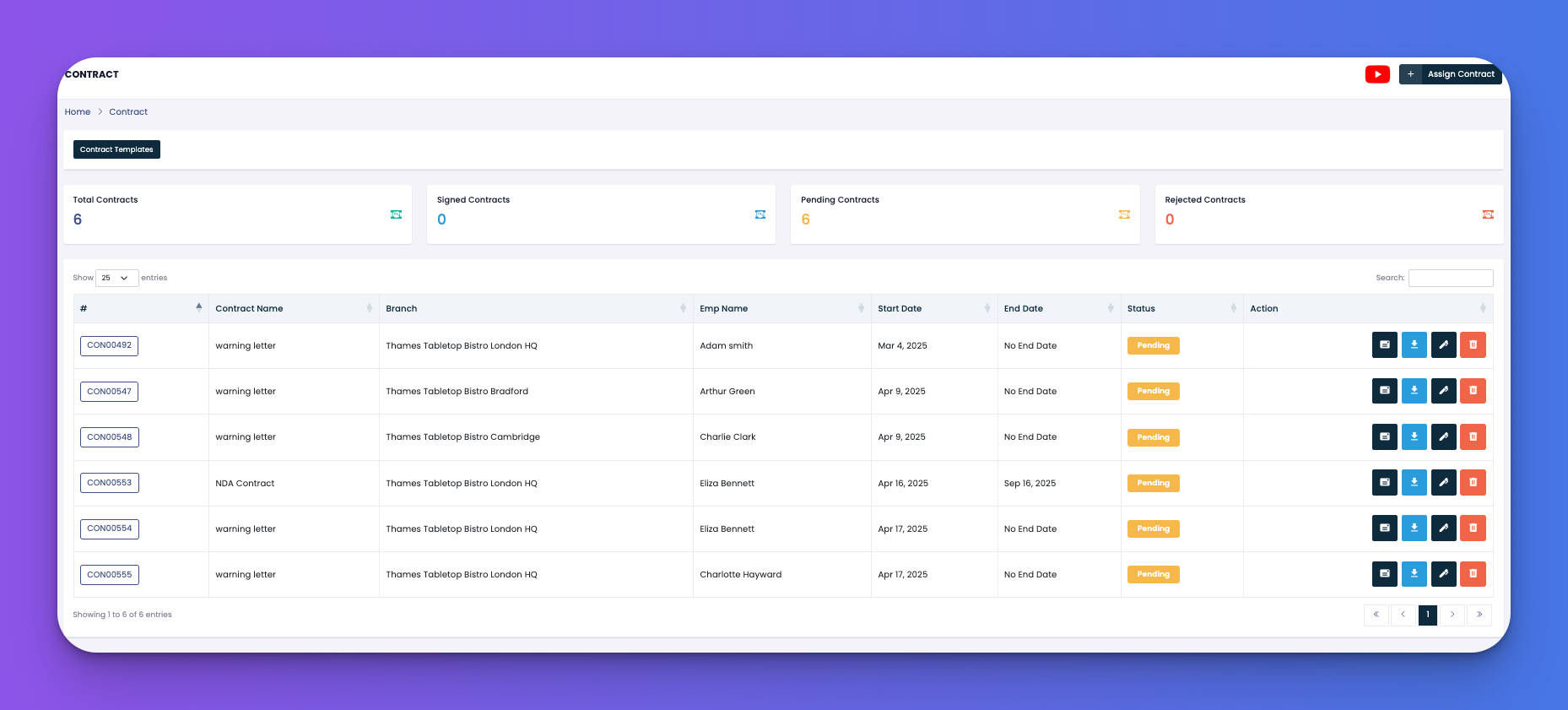
At the top, you see a quick overview:
Total Contracts: Displays the number of contracts created.
Signed Contracts: Shows how many contracts have been signed.
Pending Contracts: Contracts that are assigned but not yet signed.
Rejected Contracts: Contracts declined by employees.
Each record includes:
Contract number
Contract name
Branch assigned
Employee name
Start and end dates
Status (e.g. Signed, Pending)
Action buttons for viewing, downloading, editing, or deleting
Clicking on the “Assign Contract” button opens a modal where you can:
Select Contract Template: Choose from saved templates or click Create Contract to make a new one
Select Branch and Employee (can be left blank to assign to all)
Set Start and End Date (or tick "No Expiry")
Assign & Send: Immediately assigns and sends the contract
Assign: Assigns without sending
The Contract Templates tab lists all saved templates such as:
Sushi Employment Contract
Job Offer Letter
NDA Agreement
Employee Contracts
Each template row provides action buttons:
🟨 Preview Template
📄 Download/View Content
🖊️ Edit
➕ Add Content Section
🗑️ Delete
You also have:
🔵 Global Template: Universal layout/template settings
🔵 Set Logo: Upload company logo for contract headers
🔵 Create: Add a new contract template