The Trainer section allows you to manage individuals who are responsible for delivering training sessions. This feature is helpful for assigning and tracking who is conducting or supervising training in different branches.
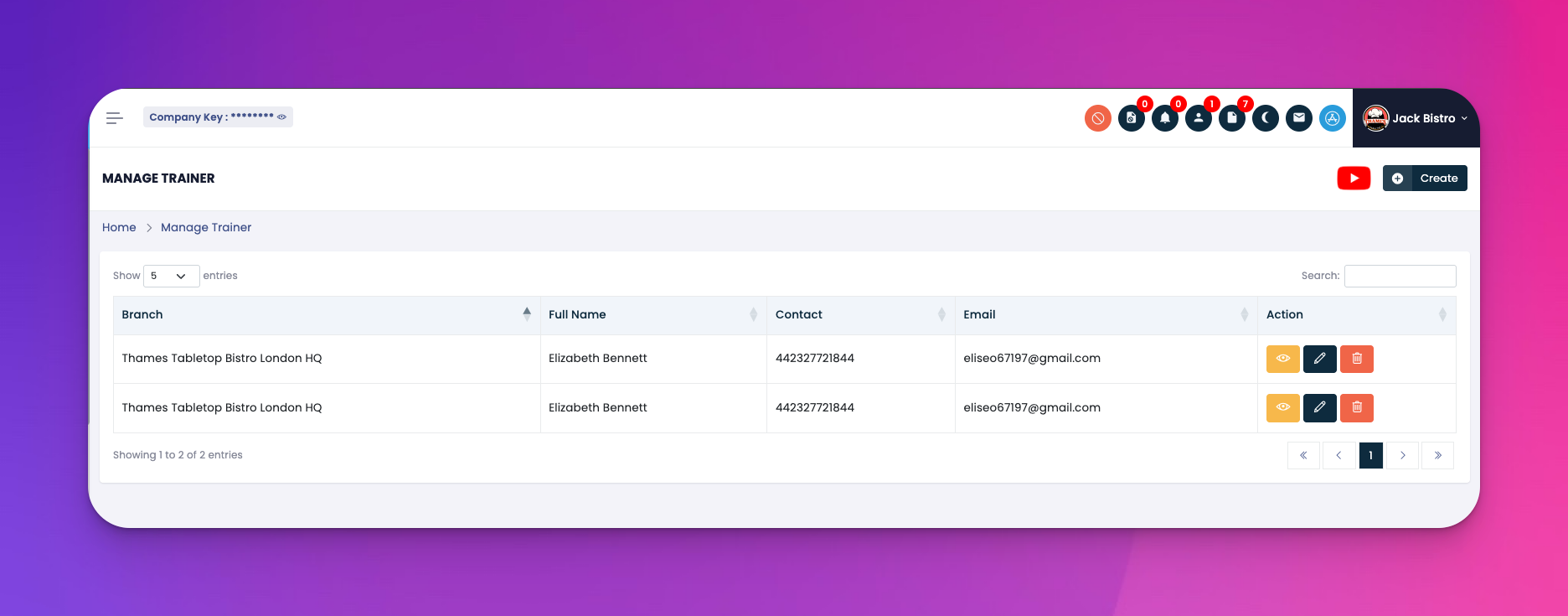
Go to: e-Learn → Trainer
Trainer List Table
Shows all existing trainers with details like:
Branch
Full Name
Contact
Email
💡 Use the right-side search bar to filter trainers quickly.
Action Buttons
🟨 Eye Icon: View trainer details
✏️ Edit Icon: Update trainer info
🗑️ Delete Icon: Remove a trainer from the system
Click the "Create" button on the top-right corner
A popup form will appear
Fill in the required fields:
Branch
First Name & Last Name
Contact
Expertise
Address
Click Create to save the new trainer
✅ Tips
Ensure email and contact fields are valid to avoid communication issues
Assign trainers per branch for better decentralization and control
Q: Can one trainer be assigned to multiple branches?
A: Currently, you can add the same trainer with different branch assignments.
Q: What happens if I delete a trainer?
A: The trainer will be removed from the list but previously assigned sessions will stay logged unless edited.
Q: Can trainers view training progress?
A: No, this section is purely for admin-level visibility and management.