The Groups section inside the Accounting module helps you organize financial transactions into meaningful categories. This makes it easier to track expenses and revenue, assign them to branches, and generate accurate reports. Groups are categorized as either Sales or Expenses, and can be edited or removed anytime.
👇👇
[Groups]
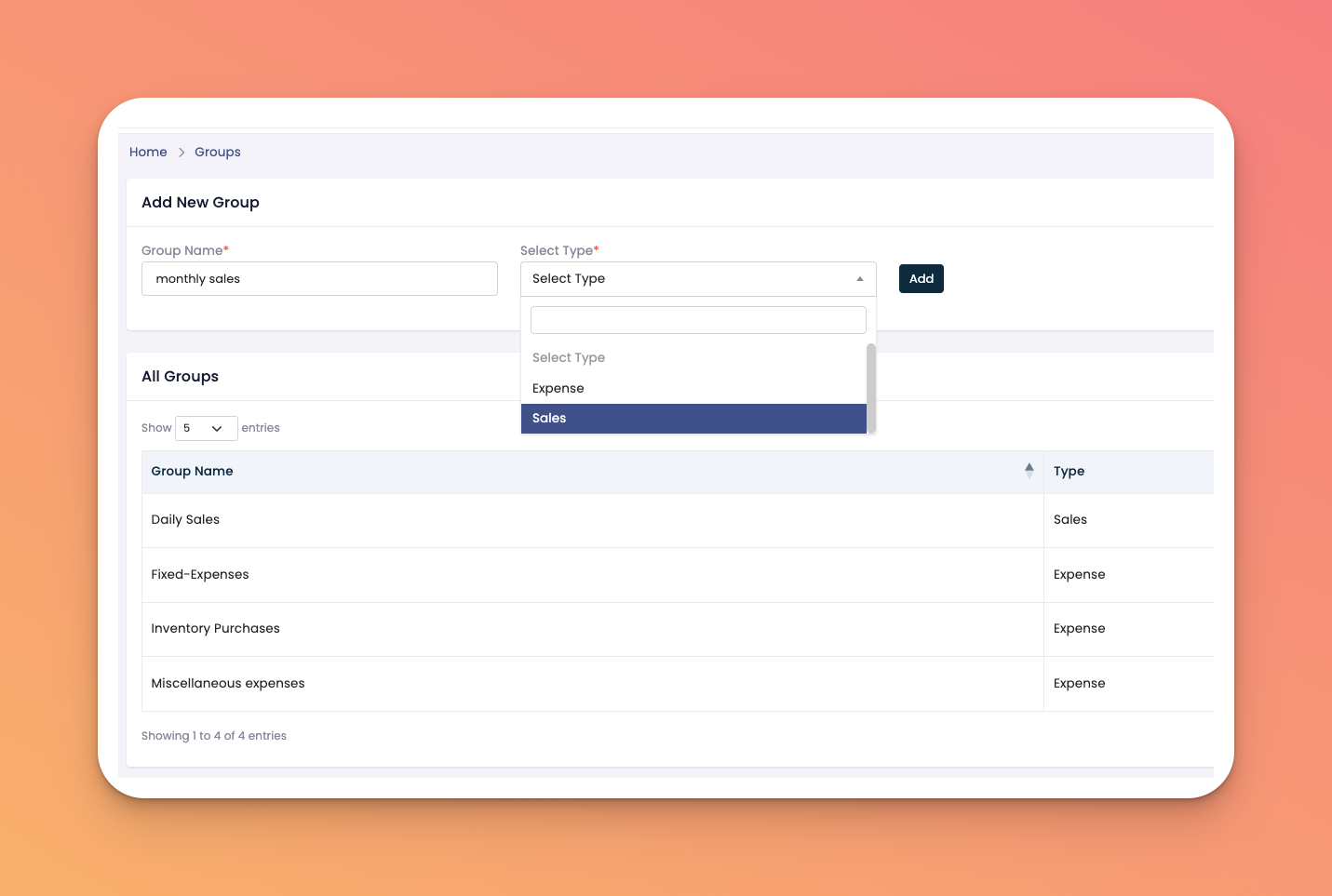
Go to: Accounting → Groups
Add New Group form with fields:
Group Name
Type (Sales or Expense)
Add button
All Groups Table listing:
Group Name
Type
Action buttons to Edit (✏️) or Delete (🗑️)
In the Add New Group section:
Enter the Group Name (e.g. Daily Sales, Inventory Purchases)
Select the Type: Sales or Expense
Click the Add button
The new group will appear below in the table of existing entries
Keep group names simple and specific for better reporting.
Grouping helps categorize similar types of transactions for easier financial analysis.
You can edit or delete a group at any time using the icons provided.
Q: Can I rename a group or change its type?
A: Yes, click the ✏️ icon to make changes to an existing group.
Q: If I delete a group, will it affect previous entries?
A: No, deleting a group won’t remove the transactions already logged under it.
Q: Is there a limit to how many groups I can create?
A: No, you can create as many groups as you need to match your financial structure.