The e-Contracts feature under Head Office allows you to push HR-related documents (like policies, agreements, and contracts) to multiple branches with ease. This keeps your documentation consistent across all locations.
👇👇
[e-Contracts]
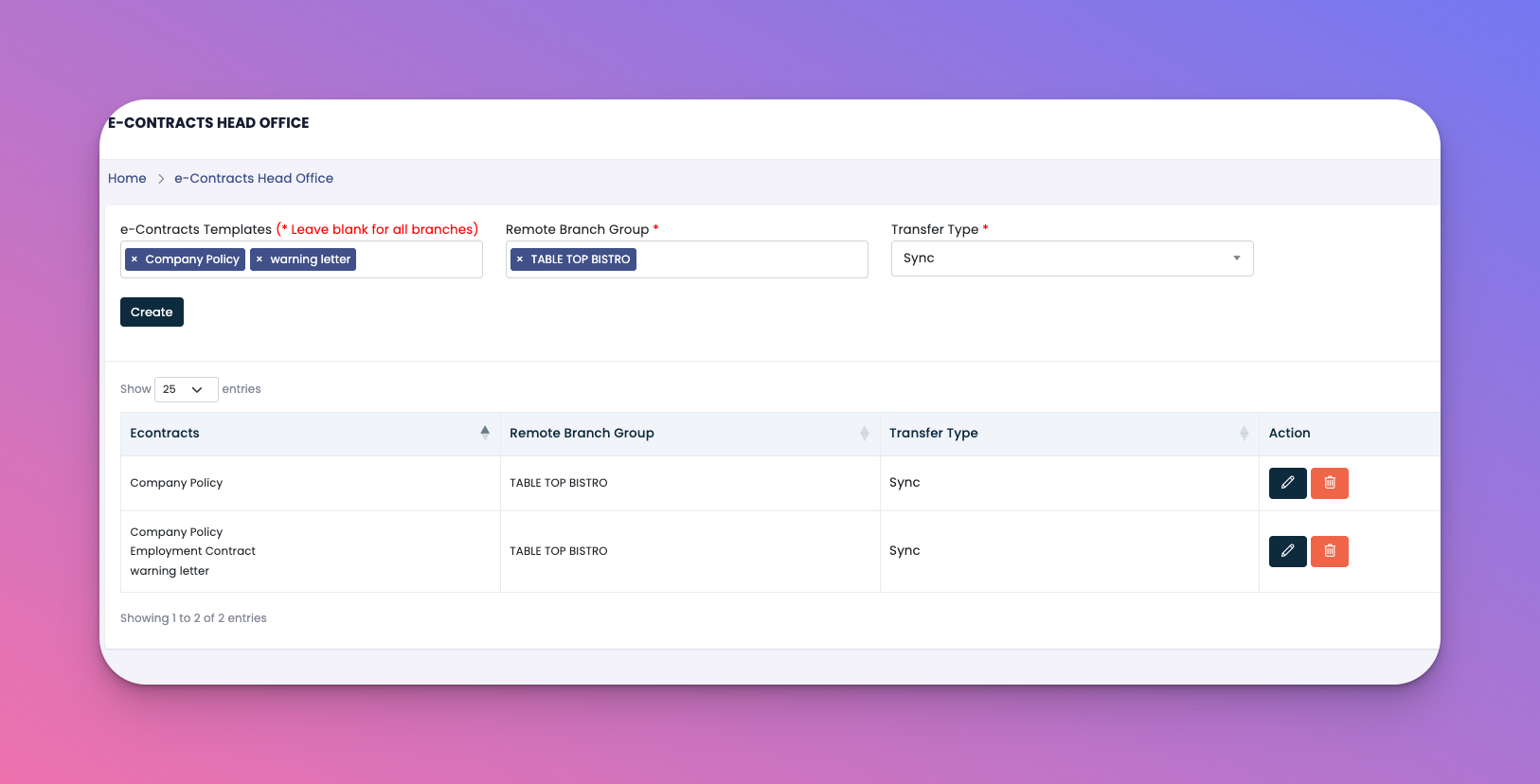
Go to: Head Office → e-Contracts
Contract Name – Type of contract being assigned (e.g., Company Policy, NDA, Employment Contract)
Remote Branch Group – The branch group receiving the contracts
Transfer Type:
🔁 Sync – Automatically updates contracts across branches when edited
📦 One Time – Sends the contract only once with no auto-updates
Actions: ✏️ Edit or 🗑️ Delete the automation
Click Create in the top-right
Choose one or more contract templates
Select a remote branch group
Choose transfer type: Sync or One Time
Save
✅ Tips
Use Sync for policies that are updated regularly (e.g., Code of Conduct)
One Time is ideal for final documents like signed agreements
Templates can be managed under the e-Contracts section in Settings
Q: Can I send contracts in bulk?
A: Yes, you can select multiple templates to send at once.
Q: What happens when I update a synced contract?
A: All assigned branches will receive the updated version automatically.
Q: Can I send different contracts to different branch groups?
A: Absolutely. Create separate automations for each group with different content.