The e-Task Head Office feature allows you to distribute operational checklists (like daily or weekly routines) across multiple branches in one go. This ensures consistent procedures and task expectations no matter where your teams are located.
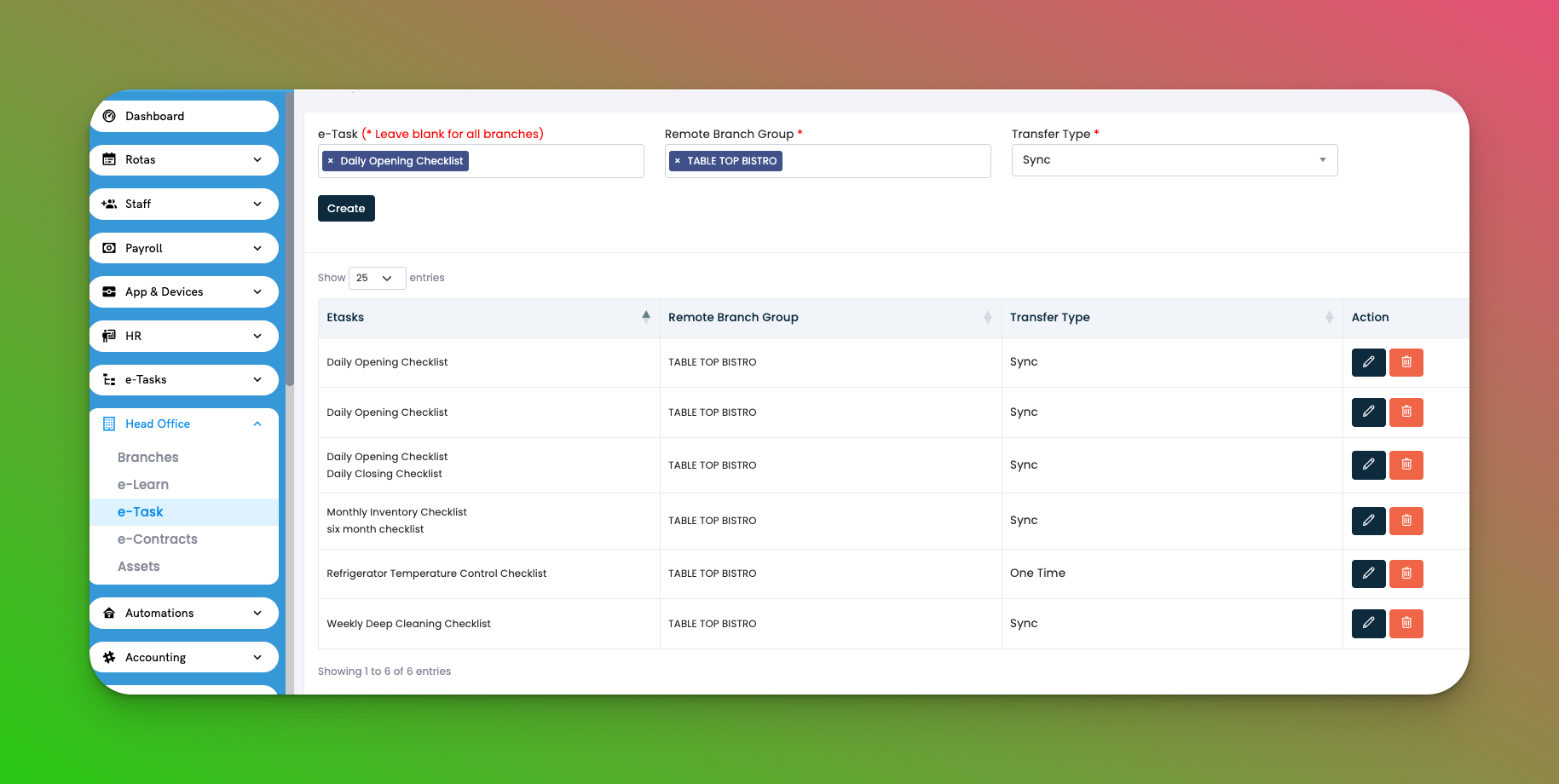
Go to: Head Office → e-Task
e-Task Name – The checklist being assigned (e.g., Daily Opening Checklist)
Remote Branch Group – Group of branches receiving the task
Transfer Type:
🔁 Sync – Keeps the checklist updated across all branches
📦 One Time – Sends a fixed version that doesn’t auto-update
Actions: ✏️ Edit the automation or 🗑️ Delete it
Click Create
Select one or more checklists
Choose the remote branch group
Select a transfer type: Sync or One Time
Click Save
✅ Tips
Use Sync to keep procedures aligned company-wide
One Time works best for one-off campaigns or trial checklists
Makes onboarding new branches faster with ready-to-go tasks
Q: Can I push more than one checklist at a time?
A: Yes, you can select multiple checklists during setup.
Q: What happens if I change a synced checklist?
A: All branches in the group receive the updated version automatically.
Q: Can I use different checklists for different branches?
A: Yes. Create multiple automations for different groups with custom assignments.