The Manager Diary in e-Tasks allows managers to log comments, feedback, or notes tied to specific dates and branches. It serves as a digital logbook for shift leaders and managers to leave behind important information for other supervisors or upper management.
👇👇
[Manager Dairy]
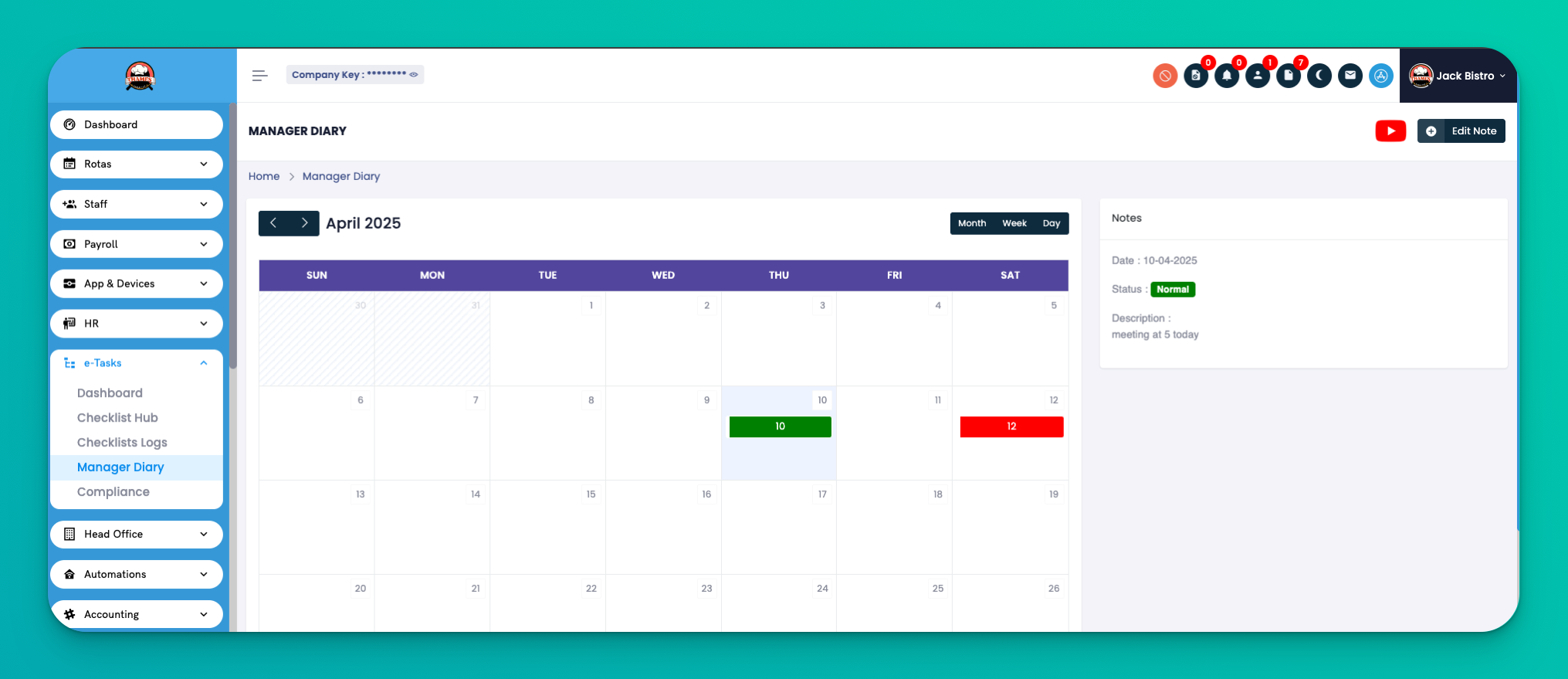
Go to: e-Tasks → Manager Diary
This section provides a date-wise diary view where managers can write and view notes by day and branch.
Each diary entry includes:
Branch – The location the note is tied to
Date – The selected day the note was written for
Comment – Manager's note or observation
Status – Whether the note is Active or Inactive
Action – You can:
🖊 Edit existing notes
📂 View entry details
🔌 Change status (Active/Inactive)
🗑 Delete note
Use the diary to share notes between shifts for better communication.
Only one entry can be created per branch per day to keep records clean.
Mark notes as Inactive if no longer relevant instead of deleting.
Q: Who can write in the Manager Diary?
A: Only users with manager permissions can access and post notes in the Manager Diary.
Q: Can I have multiple entries per day per branch?
A: No, the system allows only one entry per branch per day to avoid duplication.
Q: Can I edit a note later?
A: Yes, you can edit or update a diary entry at any time unless it's been marked inactive or deleted.
Q: Is this visible to all employees?
A: No, the diary is visible only to managers and users with specific access rights.