The Checklist Logs section allows you to track, review, and manage the history of all submitted checklists by your team. It's essential for audits, reviews, and verifying task completions across departments and branches.
👇👇
[Checklists Logs]
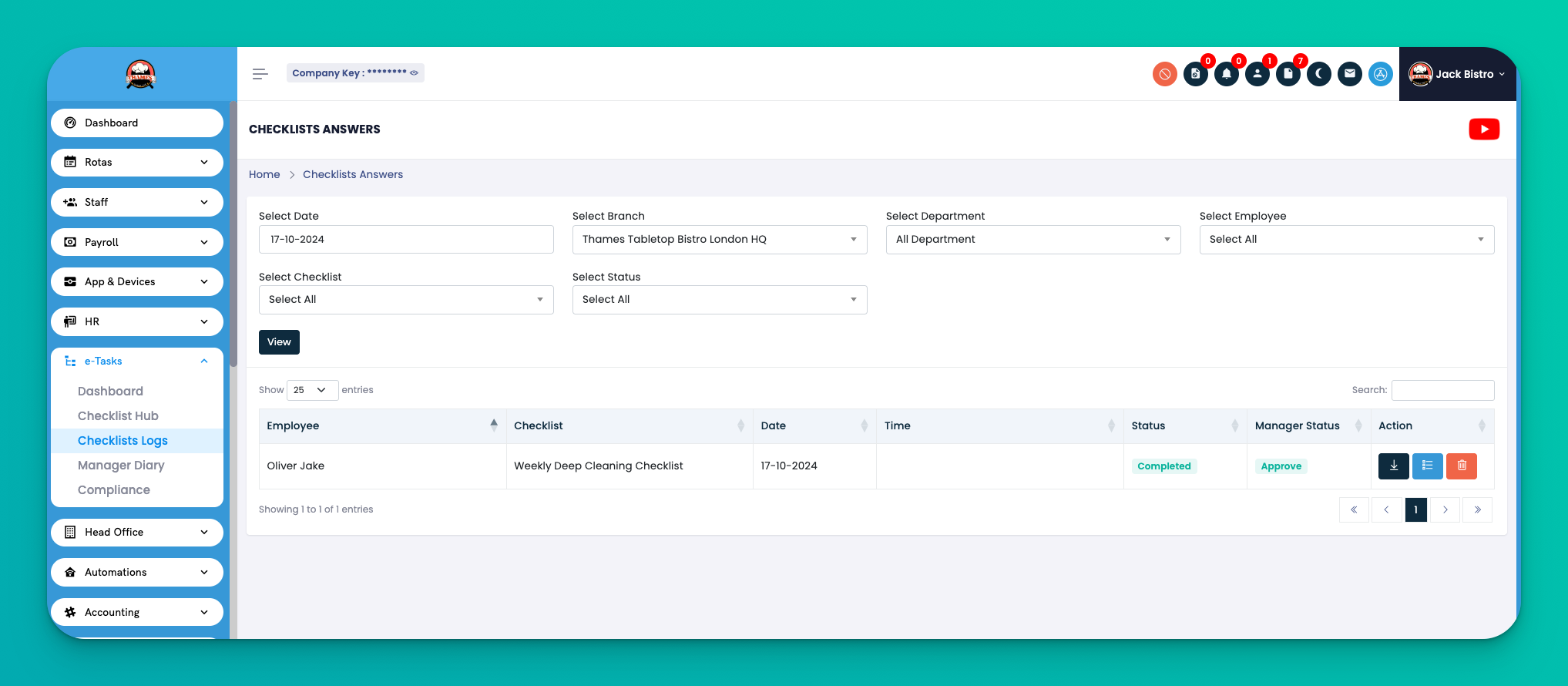
Go to: e-Tasks → Checklist Logs
This section gives you a searchable and filterable log of all checklist submissions made by staff.
Each log record includes:
Employee – Name of the staff member who submitted the checklist
Checklist – Title of the submitted checklist (e.g., Weekly Deep Cleaning Checklist)
Date – When the checklist was completed
Time – Time of submission
Status – Whether the checklist is completed or pending
Manager Status – Approval status from manager (e.g., Approved, Rejected)
Action – Icons to:
⬇️ Download submission
📋 View checklist answers
🗑️ Delete
You can filter checklist logs by:
Date
Branch
Department
Employee
Checklist Name
Status
This helps you quickly locate submissions for audits or investigations.
✅ Tips
Use filters to narrow down specific logs during audits.
Always review the Manager Status to track approvals.
Encourage teams to submit on time by regularly reviewing submissions.
Q: Can I export the checklist logs for reporting?
A: Yes, you can download individual submissions and generate internal reports manually.
Q: What if a checklist submission needs to be changed?
A: Edits are not allowed after submission. Instead, you can delete and reassign the checklist.
Q: Who can approve a checklist?
A: Only users with manager roles and proper permissions can change the Manager Status.