🎥 Video Tutorial
👇👇
[Earning Statement]
Quickly access and download your monthly earnings in the eHubt Mobile App.
Attendance
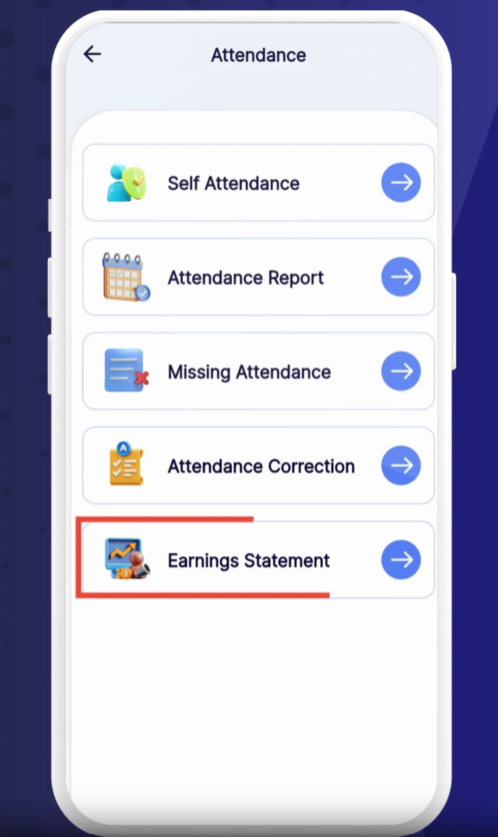
Tap Attendance from the main menu.
Earning Statement
Select Earning Statement.
0:04
Tap Attendance, then choose Earning Statement.
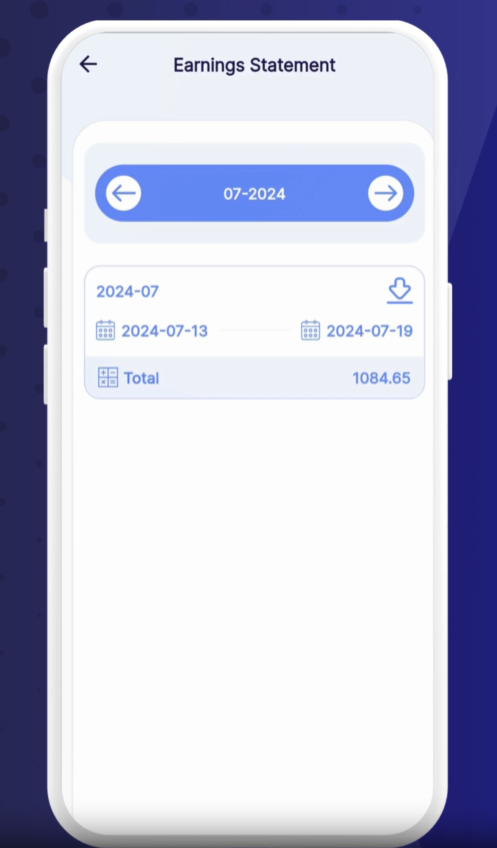
You’ll see your current month’s earnings displayed.
0:13
To view a different month, tap the Date field and select your Desired Month.
The statement will update to show that period’s totals.
0:19
To save a copy, tap the Download icon.
Your earning statement will download as a PDF for your records.
Review Regularly: Check your earnings after each pay cycle.
Compare Periods: Switch between months to track overtime or bonuses.
Save Files: Store downloaded PDFs in a secure folder for easy access during tax season.
❓ Need Help?
If you encounter any issues, visit our Help Center at desk.ehubt.io or contact your manager.