🎥 Video Tutorial
👇👇
[employee E task]
Complete your assigned checklists and submit them for manager review in the eHubt Mobile App.
e-Tasks
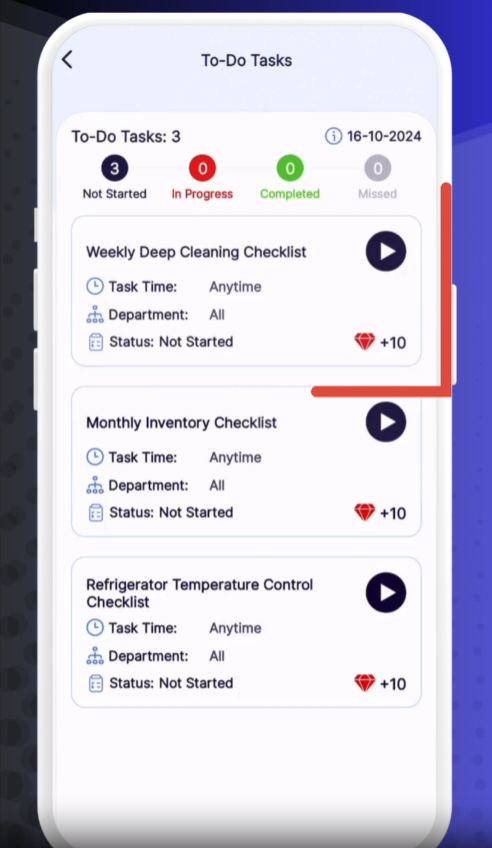
Tap e-Tasks from the main menu.
To-Do Tasks
Select To-Do Tasks to view your active checklists.
Choose a Checklist
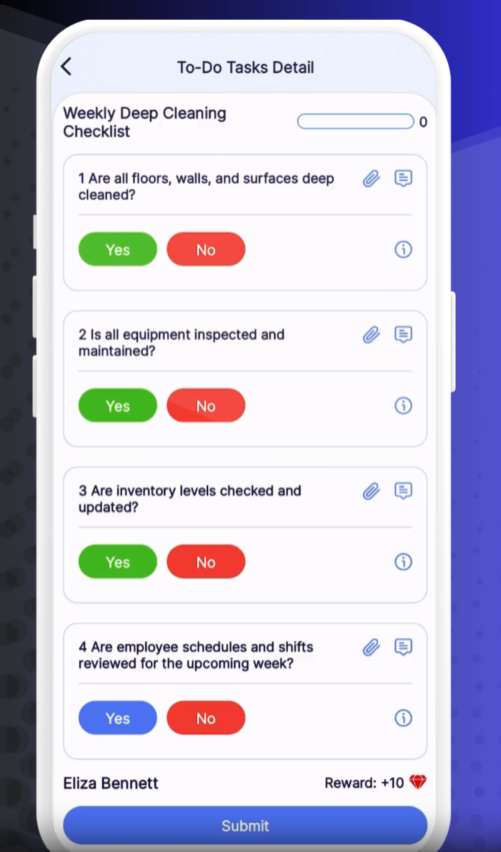
Tap the name of the checklist you need to perform.
Answer Each Question
For each item, select Yes or No.
If you answer No, you must add a brief Reason explaining why.
You may also Upload a Photo to document the issue or your work.
Submit for Review
Once all items are completed, tap Submit.
Your responses will be sent to your manager for feedback.
Approved – Manager has accepted your checklist.
Rejected – Manager has requested changes; review their comments and resubmit.
Pending – Awaiting manager review.
Tap any checklist in To-Do Tasks to see its current status and manager feedback.
❓ Need Help?
If you encounter issues or have questions about e-Tasks, visit our Help Center at desk.ehubt.io or contact your manager.