🎥 Video Tutorial
👇👇
[Video Placeholder]
Easily request to swap shifts with a colleague in the eHubt Mobile App.
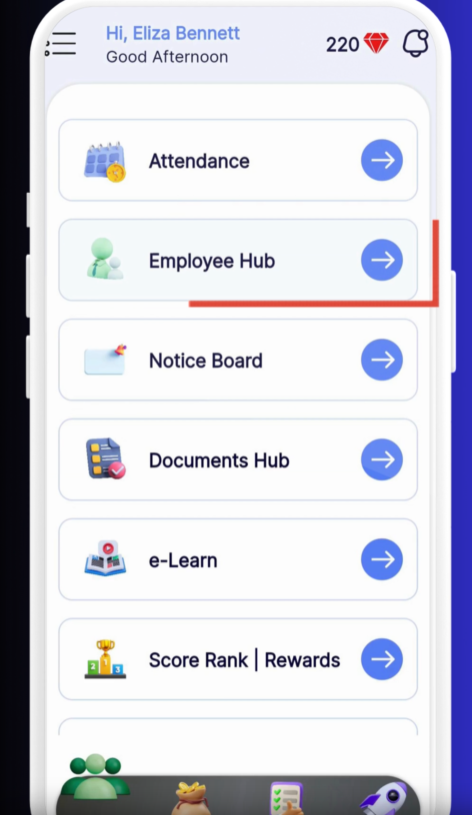
Employee Hub
Tap Employee Hub from the main menu.
Request Shift Swap
Select Request Shift Swap.
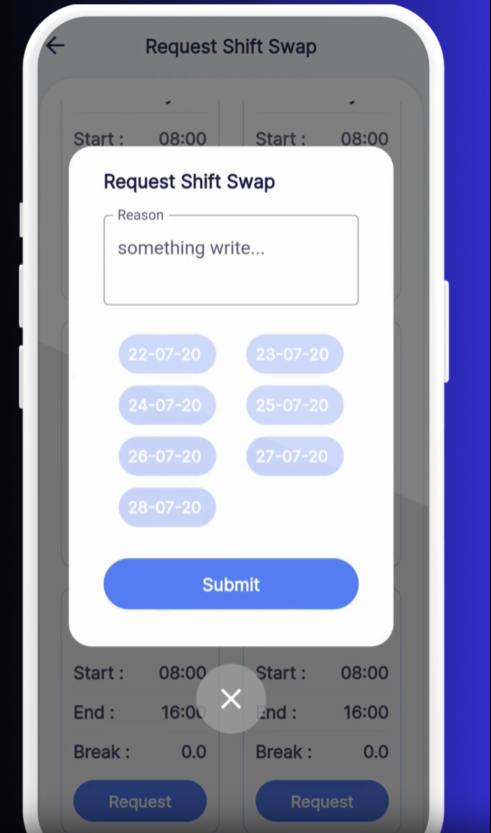
Choose the Day
Tap the shift you’d like to swap on the calendar.
State Your Reason
Enter a brief explanation for why you need the swap.
Submit
Tap Submit to send your request.
Pending Swap
Your request appears under “Pending” until it’s processed.
Approval Status
Once your manager reviews it, the status updates to Approved or Rejected.
Notify Your Colleague: Let the team member know you’ve requested a swap.
Plan Ahead: Submit early to give managers time to approve.
Check Notifications: You’ll receive an in-app alert when your request is decided.
❓ Need Help?
If you encounter any issues, visit our Help Center at desk.ehubt.io or contact your manager.