🎥 Video Tutorial
👇👇
[Work Schedule]
Easily check your past, current, and upcoming shifts in the eHubt Mobile App.
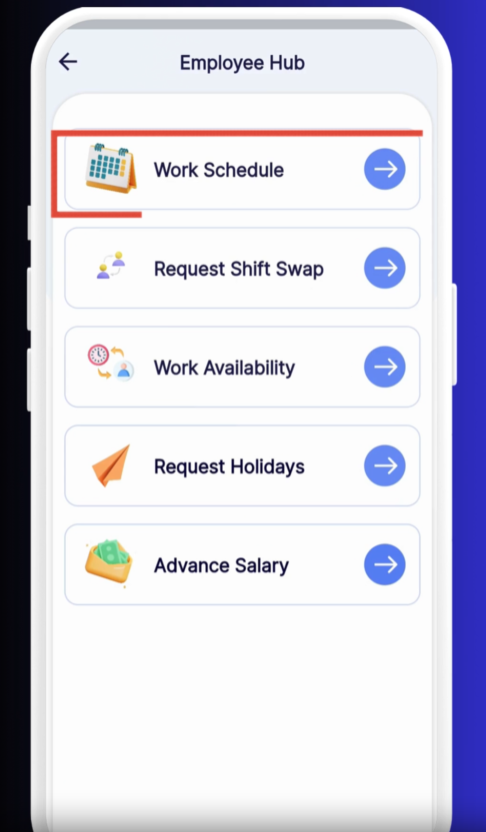
Employee Hub
Tap Employee Hub from the main menu.
Work Schedule
Select Work Schedule.
Open the Calendar View
Tap the ☰ bars icon to expand your full-week calendar.
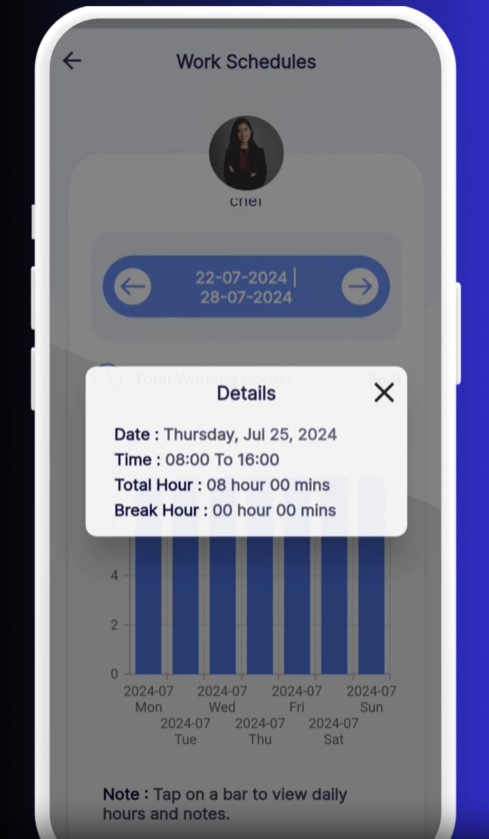
Previous Weeks
Review completed shifts and hours worked.
Current Week
Today’s shift is highlighted for quick reference.
Upcoming Weeks
Plan ahead by viewing scheduled shifts in future weeks.
Each day block shows:
Start & End Times (e.g., 09:00 – 17:00)
Break Periods, if any
Assigned Location or Department
Swipe Between Weeks: Swipe left or right on the calendar to navigate by week.
Tap for Details: Tap any day to see more information or to request shift changes.
Sync to Your Calendar: Use the share icon to add your schedule to your personal calendar.
❓ Need Help?
If you spot an error or have questions, visit our Help Center at desk.ehubt.io or contact your manager.