Manage and organize shift timings for each branch to streamline employee scheduling and ensure smooth operations across all working hours.
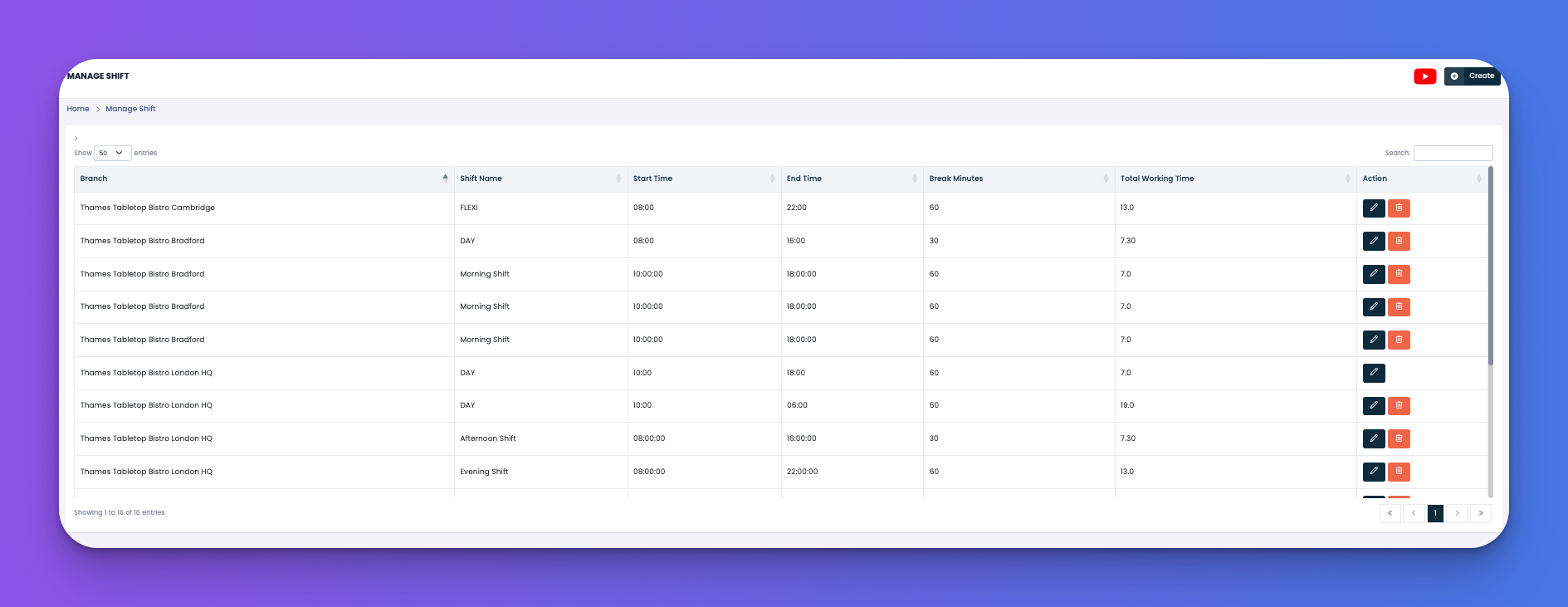
This section provides a full overview of all created shifts with details like:
Branch association
Shift name
Start and end times
Break duration
Total working hours
Action buttons for editing or deleting shifts
View all shifts across different branches
Check start/end times, breaks, and total hours
Edit existing shift details
Delete unused or outdated shifts
Branch – The location where the shift is assigned
Shift Name – Name of the shift (e.g., Morning, Day, FLEXI)
Start Time / End Time – Scheduled beginning and end of shift
Break Minutes – Allocated break time in minutes
Total Working Time – Calculated working duration excluding breaks
Action Buttons:
✏️ Edit – Modify the shift details
🗑️ Delete – Remove the shift if not in use
Use clear shift names like "Morning Shift", "Evening Shift", or "FLEXI" for clarity
Keep break minutes standardized unless different shifts require unique breaks
Regularly review working time totals to avoid scheduling conflicts
Q: Can I assign multiple shifts to the same branch?
A: Yes. Each branch can have as many shifts as needed depending on its operational hours.
Q: Is it possible to define overnight shifts?
A: Yes, simply set the end time to a later day or adjust according to the overnight timing logic supported in the system.